
EVENTS on the Intranet!
- Mar 19, 2019
- 4 min read
I’m excited to let you know that the Events section of our Intranet resources is now ready for use! Here is a brief description of what you will find there:
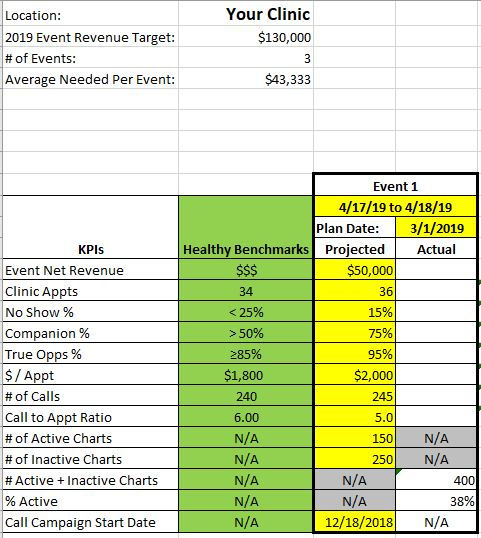
2019 VDays Event Plan – MASTER: This is the master file a clinic manager uses to create an event plan. By now the master should be downloaded to each clinic manager’s computer desktop, and I have worked with most of you to customize your plan for 2019. For each upcoming event, the clinic manager will update this file and e-mail me the updated copy. I hope this keeps event planning in 2019 simpler, more consolidated, and easier to display and share than ever!
SAMPLE EVENT PLAN:
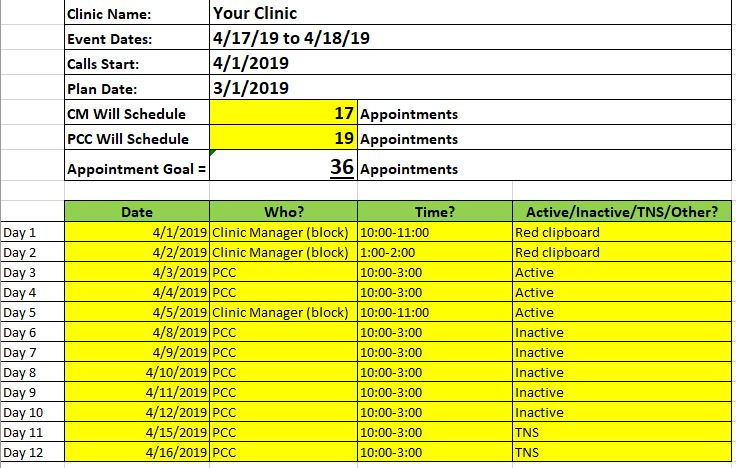
SAMPLE CALL PLAN
2019 Clinic Call Log Master: Some clinics are still sending in old versions of past call logs. Please take a moment now to download this master to your desktop. Then, before each event, you can do a “File > Save As” to save a new version for each event. If you have questions about how to do this or would like more detailed instructions, just give me a call and I’ll be glad to walk you through it step-by-step!
2019 VDAYS Non Script: Every PCC and Clinic Manager should be able to demonstrate the Verification Days Non-Script frontwards and backwards! This tool has been designed as a “funnel” to force your patient to verbally articulate their hearing struggle. Then we offer the event as a solution to the problem they have just stated. Everyone is doing a good job at demonstrating the Non-Script by now. I have observed that sometimes Question 3 can be tough to remember, especially if the patient has already given you a name in Question #2. When this happens to me, I take the name the patient has already given me (Robert), and use that name to ask my question like this:
“Mrs. Johnson, would you say that Robert is the person in your family (household, life) that says the most about your hearing?”
Remember, the point here is to make the patient talk about their hearing struggles so they realize that they do in fact have a struggle. You are often the first person who has made the patient stop for a moment to consider these questions, and to analyze their own hearing situation! Also, just by saying the word “struggle,” you further drive home the fact that the patient has a problem that we can help them with. Using your questions to make the patient talk is an excellent way to get them to say “yes” to an appointment for your event. So remember:
2019 Verification Days Event Presentation: This is the PowerPoint that we use during event prep. This explains the overall event process from start to finish, and we should all be well-versed with this process by now.
2019 Verification Days Non Script Rubric: This is a scoring rubric that you can use to self-score your own calls, or to help a co-worker hone their skills!
In addition, I would like to reinforce some key steps of the event planning process that ensure event success:
The Clinic Manager creates an Event Plan.
The Provider (Clinic Manager, Provider, Support Provider) reviews Active, Inactive, and TNS charts and identifies candidates by completing an Event Candidate Magnifier (ECM).
The Provider (Clinic Manager, Provider, Support Provider) puts event candidates (charts with ECMs) in a separate box to build an Event Box. This step is vital, because the Event Box is a visual tool that gives you an important signal; it tells you how many charts you have in the queue to call! This number, combined with your scheduled callbacks for the day, will give you a fast daily indicator of how much opportunity you have to call. If there is not a lot of opportunity, that is a huge signal that we need to identify more event candidates.
Event calls should be made from the ECM. This closes the loop on the communication from Clinic Manager/Provider to PCC to patient.
The Red Clipboard: This tool is to be used every day as a “parking lot” to save the names of those patients who would be candidates for future events. If your next event isn’t for another three months, but you talk to a patient today who would be a good candidate for that event, write their name down today on the Red Clipboard. This is a tool that all clinic staff need to know and use together as a team, so if you aren’t on board with this process yet, please implement this best practice because it works! And if you have any questions, just let me know!
In closing, I ask that you take a moment to explore the Events section of our Intranet. Get familiar with what is out there, and give me feedback on what you might need to make events more successful!
Let’s make Verification Days a success story in 2019!


Comments